
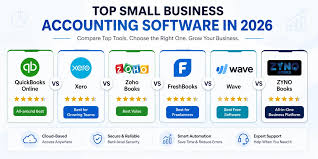
Best Accounting Software for Freelancers in 2026: The Complete Comparison
Good accounting software is not a luxury for freelancers — it is the financial nervous system of your business. Without it, you are flying blind: unsure of your actual profitability, unaware of which expenses are deductible, unprepared for quarterly tax payments, and spending hours at year-end manually sorting through bank statements trying to reconstruct your financial history. With the right platform, every dollar that flows in and out of your business is tracked, categorized, and reported automatically.
The freelance accounting software market in 2026 offers more excellent options than ever before, ranging from completely free tools to sophisticated platforms with deep integrations and tax preparation capabilities. This guide compares every major option in depth so you can choose the one that fits your business type, technical comfort level, and budget.
What Freelance Accounting Software Should Do For You
Before evaluating specific platforms, understand what good accounting software should accomplish:
Income tracking: Every client payment automatically recorded and categorized.
Expense categorization: Every business purchase automatically sorted into the correct tax category (office supplies, software, travel, etc.).
Invoice creation and delivery: Professional invoices sent directly from the platform, with payment tracking and automatic reminders for late payments.
Bank and credit card synchronization: Automatic daily import of transactions from all connected accounts, eliminating manual data entry.
Quarterly tax estimation: Real-time calculation of estimated taxes owed based on year-to-date income and expenses.
Financial reporting: Profit and loss statements, expense summaries, and cash flow reports available on demand.
Tax preparation integration: Direct export or connection to tax software to simplify year-end filing.
1. QuickBooks Self-Employed — Best for Tax Integration
QuickBooks Self-Employed is purpose-built for sole proprietors, freelancers, and independent contractors. It is not a scaled-down version of the full QuickBooks product — it is a purpose-designed tool for exactly the financial situation most freelancers face.
Key Features
Automatic mileage tracking: The mobile app uses your phone’s GPS to automatically detect and log business trips. You swipe right to classify a trip as business, left for personal. Over a year of business driving, this feature alone can identify thousands of dollars in deductible mileage you would otherwise miss.
Real-time quarterly tax estimates: As you categorize income and expenses throughout the year, QuickBooks Self-Employed continuously updates your estimated quarterly tax liability. This is displayed prominently on your dashboard so you always know approximately what you owe and can adjust your tax savings accordingly.
Transaction categorization: Connect your business bank accounts and credit cards and QuickBooks automatically downloads and categorizes transactions. You review and approve categories rather than entering data manually.
Schedule C readiness: At tax time, your income and expense data maps directly to Schedule C categories. The platform produces a Schedule C summary that you or your accountant can use to file your return.
TurboTax integration: QuickBooks Self-Employed bundles with TurboTax Self-Employed at a discount. Your full year of financial data transfers directly to TurboTax with one click, eliminating virtually all manual tax data entry.
Pricing
QuickBooks Self-Employed starts at approximately $15 per month. The bundle with TurboTax Self-Employed is approximately $25 per month and includes one federal and one state tax return — effectively making the tax software free if you would purchase TurboTax anyway.
Best For
Freelancers who want the deepest tax integration, who drive for business regularly, and who value the TurboTax bundle. Also excellent for freelancers whose accountants or CPAs are already familiar with QuickBooks.
→ Best Tax Software for Self-Employed Americans
2. FreshBooks — Best for Creative and Service Freelancers
FreshBooks is the accounting platform of choice for a large segment of creative and service-based freelancers: designers, photographers, writers, consultants, coaches, and anyone whose business revolves around client relationships and project-based billing.
Key Features
Industry-leading invoicing: FreshBooks invoices are polished, customizable, and professional. Clients receive a clean invoice with a prominent Pay Now button that accepts credit cards, ACH bank transfers, and PayPal. Automatic payment reminders can be scheduled at intervals you choose — dramatically reducing the awkward experience of manually chasing late payments.
Time tracking: Built-in time tracking allows you to log hours against specific clients or projects and automatically convert tracked time to invoice line items. For freelancers who bill hourly, this eliminates the need for a separate time tracking tool.
Project management: FreshBooks includes basic project management features — shared files, team messaging, and task tracking — that make it a partial substitute for dedicated project management tools for smaller operations.
Expense tracking and receipt capture: Photograph receipts with the mobile app and FreshBooks automatically extracts and categorizes the expense data. Connect your bank accounts for automatic transaction import.
Financial reporting: Profit and loss statements, expense reports, invoice aging reports, and revenue by client reports are all available with one click.
Pricing
FreshBooks Lite starts at $17 per month and supports up to 5 active clients. The Plus plan ($30 per month) supports up to 50 clients and adds features like automatic payment reminders and double-entry accounting. The Premium plan ($55 per month) is unlimited.
Best For
Service-based freelancers with ongoing client relationships who want beautiful invoicing, time tracking, and project management in one platform. Less ideal for freelancers who need deep tax integration or complex inventory management.
3. Wave — Best Free Option
Wave is the most remarkable value proposition in freelance accounting: core accounting and invoicing are completely free, with no limitations on the number of clients, invoices, or bank connections. Wave earns revenue through optional paid services — credit card payment processing (2.9 percent plus $0.60 per transaction) and payroll services for those with employees.
Key Features
Free unlimited invoicing: Create professional invoices, send them to clients, and accept online payments — all within the free tier. The invoice design is clean and professional.
Free bank connections: Connect unlimited bank accounts and credit cards for automatic transaction import and categorization.
Double-entry accounting: Unlike some simplified freelancer tools, Wave uses proper double-entry accounting, producing accurate balance sheets and income statements.
Receipt scanning: The Wave mobile app includes receipt scanning that extracts expense data automatically.
Free financial reports: Profit and loss statements, balance sheets, and cash flow statements are all available at no cost.
What Wave Does Not Include for Free
Payroll (paid add-on), payment processing (transaction fees apply), and dedicated customer support (email support only on the free tier; priority support is a paid add-on).
Pricing
Free for accounting and invoicing. Payment processing: 2.9 percent plus $0.60 for credit cards, 1 percent for bank payments (minimum $1). Payroll is approximately $20 per month plus $6 per contractor paid.
Best For
Budget-conscious freelancers who primarily receive bank transfers or checks (avoiding card processing fees), new freelancers building their first accounting system, and freelancers who want solid accounting software without a monthly subscription.
4. HoneyBook — Best for Client Management and Workflows
HoneyBook occupies a unique position in the freelancer software market: it is less a pure accounting tool and more a complete client management platform that includes invoicing and basic financial tracking. Photographers, event planners, wedding vendors, coaches, and other relationship-focused service providers consistently rate HoneyBook as their platform of choice.
Key Features
End-to-end client workflow: From initial inquiry through proposal, contract, invoice, and payment — HoneyBook manages the entire client journey in one platform. Automated workflows can send proposals, follow-up emails, and payment reminders without manual action.
Contract templates: Built-in contract templates for common freelance service types, with e-signature collection built in.
Online booking: Clients can book services, sign contracts, and pay deposits through a single link — significantly streamlining the onboarding process.
Payment tracking: Track all client payments and outstanding balances in one place.
What HoneyBook Is Not
HoneyBook is not a replacement for full accounting software. It does not produce Schedule C-ready reports, does not calculate quarterly tax estimates, and does not provide the expense categorization depth that QuickBooks or FreshBooks offers. Most HoneyBook users also use a separate accounting tool (or at minimum connect HoneyBook to QuickBooks) for full financial management.
Pricing
HoneyBook starts at $36 per month (or $29 per month billed annually). A free trial is available.
Best For
Photographers, event planners, coaches, designers, and other service freelancers who prioritize client experience and want automated client management workflows. Pair with Wave (free) for full accounting coverage.
5. Xero — Best for Growing Freelance Businesses
Xero is a professional-grade cloud accounting platform designed for small businesses that have grown beyond the simplicity of freelancer-focused tools. It offers more depth than QuickBooks Self-Employed or FreshBooks in areas like project profitability tracking, multi-currency support, and integrations with hundreds of third-party applications.
Key Features
Comprehensive accounting: Full double-entry accounting with bank reconciliation, accounts payable, accounts receivable, and detailed financial reporting.
Project tracking: Track income and expenses by project and see true project profitability — important for freelancers who want to understand which types of work are most profitable.
Inventory tracking: For freelancers who sell physical products alongside services, Xero handles inventory in ways that simpler tools do not.
500+ integrations: Xero connects with an enormous ecosystem of business tools — from CRMs to payment processors to industry-specific applications.
Multi-currency: For freelancers with international clients, Xero handles multiple currencies with automatic exchange rate updates.
Pricing
Xero’s Starter plan is $15 per month but limits invoices and transactions. The Standard plan ($42 per month) is more appropriate for most freelancers with regular business activity. The Premium plan ($78 per month) adds multi-currency support.
Best For
Freelancers who have built a substantial business with complex needs — multiple revenue streams, international clients, project-based profitability tracking, or a need for extensive third-party integrations. Overkill for most beginning freelancers but excellent for established businesses.
Making Your Final Choice
Start with Wave if you are new to freelancing, on a tight budget, or primarily receive bank transfers rather than credit card payments.
Choose QuickBooks Self-Employed if tax integration is your top priority and you want mileage tracking and TurboTax connectivity.
Choose FreshBooks if you have regular ongoing client relationships, bill hourly, and want beautiful invoicing with time tracking.
Choose HoneyBook if you are a service freelancer who wants to automate your client workflow from inquiry to payment.
Choose Xero if you have grown to a point where simpler tools no longer meet your needs.
→ Best Bank Accounts for Freelancers in the US → Best Invoicing Tools for Freelancers 2026 → How to Separate Personal and Business Finances → Complete Freelance Finance Guide